- Compatible XF 2.x versions
- 2.2 / 2.3
DESCRIPTION:
------------
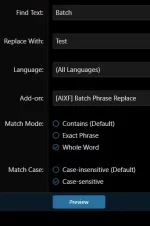
This add-on allows administrators to search for and replace phrases
in bulk, with a preview step and optional add-on/language filtering.
It is a powerful tool for making mass phrase changes efficiently.
-----------------------------
Core Features
-----------------------------
-----------------------------
Admin Panel Integration
-----------------------------
1. Admin Menu Link
- [AIXF] Batch Phrase Replace
- URL: admin.php?batch-phrase-replace/action
2. Success Screen
- Download CSV Log
- View Logs
- Delete Log
-----------------------------
Safety
-----------------------------
1. Backup Warning
"Phrase replacements can be permanent and may not be undone unless you restore from a backup.
This is the last warning you will receive before your phrases are changed."
2. Manual Confirmation Required
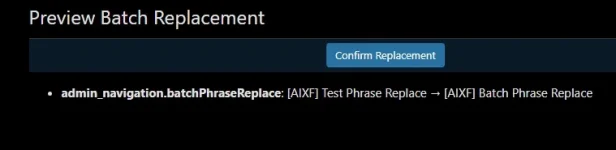
- Changes only apply after clicking Confirm.
3. CSV Logs = Recovery Path
- Use logs to manually restore content.

-----------------------------
Coming Soon
-----------------------------
1. Clean Preview UI
- Red/green headers
- Dark background cells
- Monospace white text
- Backup warning before replacements are made.
2. Wild card setting
- Only if needed. Would be able to do something like ldcard or wild
-----------------------------
Installation Instructions
-----------------------------
1. Upload the contents of the "upload" folder to your XenForo root.
2. In the Admin Panel, go to Add-ons → Install/upgrade from archive.
3. Select the add-on ZIP and install. Or unzip and upload.
-----------------------------
🗑 Uninstallation Instructions
-----------------------------
1. In the Admin Panel, go to Add-ons → uninstall [AIXF] Batch Phrase Replace.
2. To delete the files from the server:
Visit: admin.php?add-ons/AIXF_BatchPhraseReplace/delete-files
3. Confirm deletion to remove all add-on files.
Delete manually or from View Logs page.
------------
This add-on allows administrators to search for and replace phrases
in bulk, with a preview step and optional add-on/language filtering.
It is a powerful tool for making mass phrase changes efficiently.
-----------------------------
Core Features
-----------------------------
- Replace phrases in bulk with preview confirmation.
- Filter by language.
- Filter by specific add-ons.
- Match modes: Contains, Whole Word, Exact.
- Match case options: Sensitive / Insensitive.
- Preview changes before applying them.
- CSV log of changes saved to /internal_data/batch_phrase_replace/.
- View, download, or delete logs from the Admin Panel.
- Delete add-on files from the Admin Panel after uninstall.
-----------------------------
Admin Panel Integration
-----------------------------
1. Admin Menu Link
- [AIXF] Batch Phrase Replace
- URL: admin.php?batch-phrase-replace/action
2. Success Screen
- Download CSV Log
- View Logs
- Delete Log
-----------------------------
Safety
-----------------------------
1. Backup Warning
"Phrase replacements can be permanent and may not be undone unless you restore from a backup.
This is the last warning you will receive before your phrases are changed."
2. Manual Confirmation Required
- Changes only apply after clicking Confirm.
3. CSV Logs = Recovery Path
- Use logs to manually restore content.
-----------------------------
Coming Soon
-----------------------------
1. Clean Preview UI
- Red/green headers
- Dark background cells
- Monospace white text
- Backup warning before replacements are made.
2. Wild card setting
- Only if needed. Would be able to do something like ldcard or wild
-----------------------------
Installation Instructions
-----------------------------
1. Upload the contents of the "upload" folder to your XenForo root.
2. In the Admin Panel, go to Add-ons → Install/upgrade from archive.
3. Select the add-on ZIP and install. Or unzip and upload.
-----------------------------
🗑 Uninstallation Instructions
-----------------------------
1. In the Admin Panel, go to Add-ons → uninstall [AIXF] Batch Phrase Replace.
2. To delete the files from the server:
Visit: admin.php?add-ons/AIXF_BatchPhraseReplace/delete-files
3. Confirm deletion to remove all add-on files.
Delete manually or from View Logs page.