![[VNXF 2x] More Threads](/data/resource_icons/0/285.jpg?1770647263)
- Compatible XF 2.x versions
- 2.2, 2.3
VNXF would like to update members with a new add-on called [VNXF 2x] More Threads - Show related posts, interesting posts, and new posts . Actually, there are many similar add-ons shared for free, but with the latest version of XenForo, they either don't display or are in the wrong location. [VNXF 2x] More Threads - Show related posts, interesting posts, and new posts will be displayed at the bottom of the first post in the thread, above the tool buttons (edit, delete, report...).
Note: This add-on needs to be installed along with the [VNXF 2x] Image View add-on - Allows guests to view full-size attached images like members to handle thumbnail display.
Responsive interface.
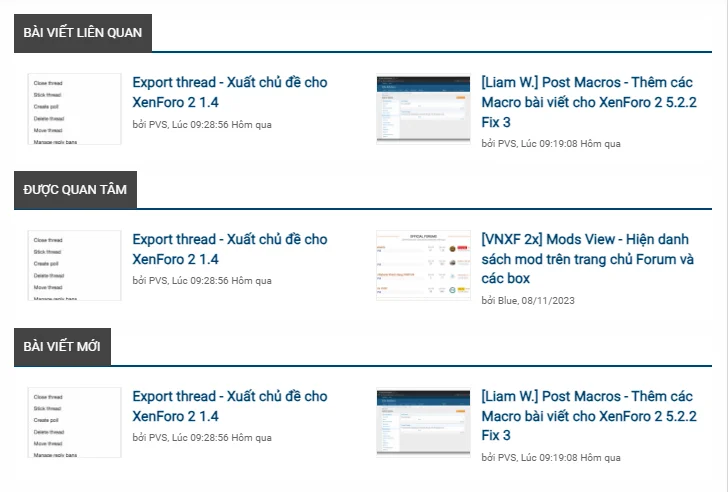
The "See More" section is divided into two columns, placed below the article you are currently viewing, and displays two parts:
1. Related Articles: The most recent related article based on the title of the article you are viewing.
2. Featured Articles: The most viewed article within the most recent period (number of days) that you specify.
3. Latest Articles: The newest article in the category or on the entire page. This section can be enabled or disabled as desired.
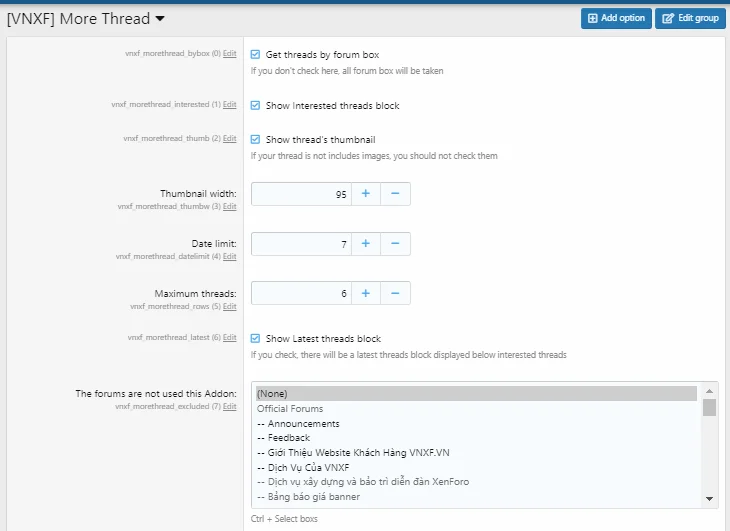
You can choose whether or not to display thumbnail images of posts.
Additionally, in the options section you can choose:
- To display all posts or specific categories.
- To select the number of posts to display.
- To remove the add-on from the forum boxes you want.
Note: This add-on needs to be installed along with the [VNXF 2x] Image View add-on - Allows guests to view full-size attached images like members to handle thumbnail display.
Responsive interface.
The "See More" section is divided into two columns, placed below the article you are currently viewing, and displays two parts:
1. Related Articles: The most recent related article based on the title of the article you are viewing.
2. Featured Articles: The most viewed article within the most recent period (number of days) that you specify.
3. Latest Articles: The newest article in the category or on the entire page. This section can be enabled or disabled as desired.
You can choose whether or not to display thumbnail images of posts.
Additionally, in the options section you can choose:
- To display all posts or specific categories.
- To select the number of posts to display.
- To remove the add-on from the forum boxes you want.


