- Compatible XF 2.x versions
- 2.3
To use this plugin, you need to have the XenDev Update Manager plugin installed on your forum.
XenDev Update Manager : Here
English Language Pack included .
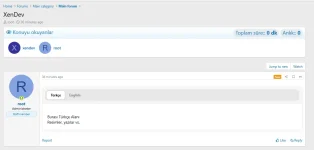
 [XenDev] Topic Readers is a modern and dynamic plugin designed to take forum interaction to the next level, fully compatible with XenForo 2.3 . It not only shows who has read the topic, but also measures how much time users spend on the content, providing real engagement data.
Here are the detailed features and usage guide for this powerful plugin:
The plugin transforms forum traffic from mere numbers into a vibrant community experience.
1.
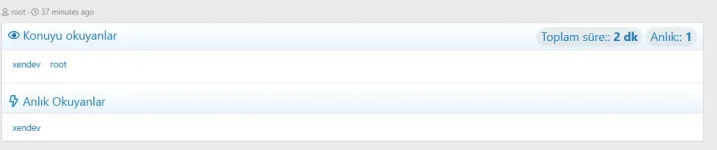
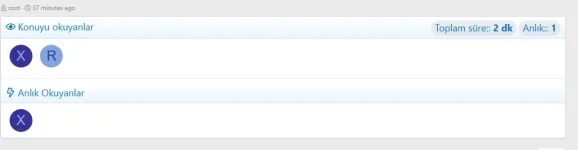
Shows who has visited the location within the last specific time period (e.g., the last 24 hours).
2.
It lists the users who are viewing the topic at that moment. It stimulates interaction by creating a "I'm not alone" feeling in the forum.
3.
It measures how long the user stays on the page using an AJAX ping system.
4.
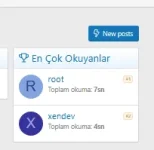
A perfect tool to reward the forum's most loyal readers!
Installing and configuring the plugin is quite simple:
To get the most out of the extension, you can try these settings:
XenDev Update Manager : Here
English Language Pack included .
[XenDev] Topic Readers is a modern and dynamic plugin designed to take forum interaction to the next level, fully compatible with XenForo 2.3 . It not only shows who has read the topic, but also measures how much time users spend on the content, providing real engagement data.Here are the detailed features and usage guide for this powerful plugin:
 Key Features
The plugin transforms forum traffic from mere numbers into a vibrant community experience.1.  Readers of the Subject (Past Traces )
Shows who has visited the location within the last specific time period (e.g., the last 24 hours).
[] Appearance Options: Avatar only, username only, or both (Chip mode).
[] Flexibility: The "Show all" feature provides an organized view without bloating the list.
2.  Live Readers
It lists the users who are viewing the topic at that moment. It stimulates interaction by creating a "I'm not alone" feeling in the forum.
[] Real-time Data: A custom time window that filters only active data.
3.  Reading Time Tracking
It measures how long the user stays on the page using an AJAX ping system.
[] Smart Tracking: A limiting mechanism is in place to prevent time from accumulating unnecessarily when a tab is minimized to the background.
[] Statistics: Reports total reading times based on topic.
4.  Most Frequent Readers (Leaderboard )
A perfect tool to reward the forum's most loyal readers!
[ Widget Support: Can be displayed as a top 5/10 list in the sidebar or on the forum homepage.]
 Installation and Settings
Installing and configuring the plugin is quite simple: Installation Steps
[] Upload the plugin files to your server.
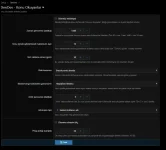
[] In the Admin Panel > Plugins menu, find the [XenDev] Topic Readers plugin and click the "Install" button.- Access the settings by following this path: Admin Panel > Installations > Options > [XenDev] Readers .
 Configuration Table
| Feature | Explanation | Suggested Value |
| Time Window | The length of time readers remain on the list | 60 - 1440 min |
| Instant Window | "Here now" counting period | 3-10 minutes |
| Ping Range | Signal frequency for time tracking. | 15 - 25 seconds |
| View Mode | Avatar or name? | Avatar + Name |
 Who would benefit from this ?
[ Active Communities: For those who want to prove the forum is lively.
[ Content-Focused Sites: For administrators who want to understand which topics are actually being "read" (not just clicked on). [Competition Lovers: Forums that love gamification elements and motivate users with leaderboards.
]
 Proposed Strategy
To get the most out of the extension, you can try these settings:Pro Tip: Keeping the ping interval too low (e.g., 5 seconds) can increase server load. 20 seconds provides an ideal balance.
[ Widget Placement: Place the Top Readers widget in the right sidebar of the forum homepage.]