
- Compatible XF 2.x versions
- 2.3
To use this plugin properly, you must install the XenDev Update Manager plugin:
[XenDev] Viewing Statistics is an advanced statistics plugin developed for XenForo 2.3-based forums.
This plugin allows you to track profile, topic, and forum views ; it also displays data such as recent viewers , currently active visitors , and most viewed content
. In short, this plugin transforms your forum from a classic content platform into a more vibrant, measurable, and interactive structure.
The main purpose of this plugin is to make activity within the forum visible.
Normally, when a user visits a topic, profile, or forum, this activity often remains invisible. This plugin, however, records these views and provides data such as:
1.
It records how many times member profiles have been viewed.
2.
It makes topic-based actions visible.
3.
It measures how often forum categories are visited.
4.
This is one of the plugin's most notable features.
It instantly lists users who have viewed the relevant content within a specific time window.
Supported areas:
5.
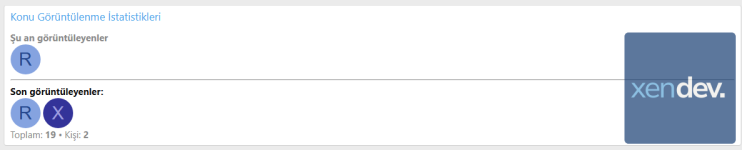
A list of users who recently visited the content can be displayed.
This feature allows you to:
Username, avatar, or both can be displayed as desired.
6.
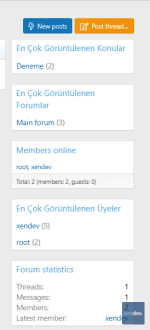
The following lists can be displayed on the homepage or in appropriate widget areas:
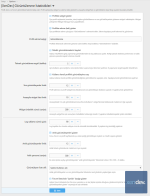
The plugin comes with some very useful options in the admin panel.
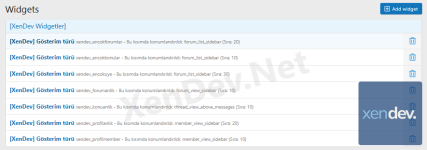
After installation, the plugin can create several pre-designed widget layouts. For example:
Installation is quite simple.


 What are [XenDev] Viewing Statistics?
[XenDev] Viewing Statistics is an advanced statistics plugin developed for XenForo 2.3-based forums.This plugin allows you to track profile, topic, and forum views ; it also displays data such as recent viewers , currently active visitors , and most viewed content
. In short, this plugin transforms your forum from a classic content platform into a more vibrant, measurable, and interactive structure.
 What does this extension do?
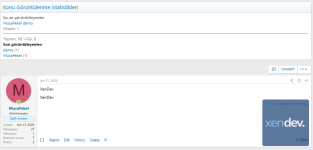
The main purpose of this plugin is to make activity within the forum visible.Normally, when a user visits a topic, profile, or forum, this activity often remains invisible. This plugin, however, records these views and provides data such as:
- How many times has a profile been viewed?
- Who last visited a forum?
- How many people are currently researching this topic?
- Which topics have the most views?
- Which forums or members are the most popular?
 Key Features
1.  Profile View Tracking
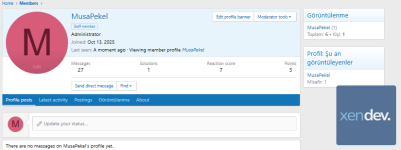
It records how many times member profiles have been viewed.- The profile page may display total views.
- If desired, it can be presented as a dedicated tab within the profile .
- The last users who viewed the video can be listed.
- More meaningful statistics can be provided by using a unique visitor logic.
2.  Topic Viewing Statistics
It makes topic-based actions visible.- It supports total viewing data for the topic.
- The members who last viewed the topic can be listed.
- Active users currently viewing the topic can be shown.
- Guest visitors can also be counted separately.
3.  Forum View Tracking
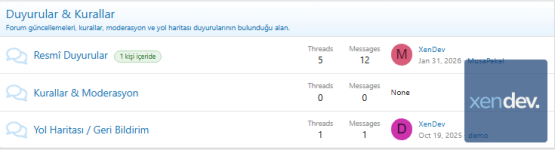
It measures how often forum categories are visited.- Forum-based viewing logs are kept.
- The most recent users who viewed the video can be shown.
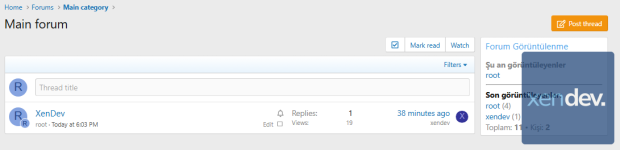
- A list of currently active users in the forum can be displayed.
- The forum list includes support for displaying a small, temporary user badge .
4.  Realtime Viewers
This is one of the plugin's most notable features.It instantly lists users who have viewed the relevant content within a specific time window.
Supported areas:
- Profile pages
- Subject pages
- Forum pages
- Members can be listed separately.
- The number of guests can be displayed separately.
- The limit for the number of people that can be displayed is manageable.
5.  Recently Viewed
A list of users who recently visited the content can be displayed.This feature allows you to:
- In the profile
- On the subject
- In the forum
Username, avatar, or both can be displayed as desired.
6.  Most Viewed Widgets
The following lists can be displayed on the homepage or in appropriate widget areas:- Most viewed topics
- Most viewed forums
- Most viewed members
 Current Settings
The plugin comes with some very useful options in the admin panel.The main settings are as follows:
| Adjustment | Explanation |
|---|---|
| Show widget on profile | Turns the member profile viewing widget on/off. |
| Enable the profile tab. | The profile displays a separate "Views" tab. |
| Profile tab title | It allows you to customize the tab name. |
| Register guests | Guest visitors are included in the logs. |
| Count your own views | Determines whether a user's own profile visits will be counted or not. |
| Deduplication period | Prevents the same user from being counted repeatedly within a short interval. |
| Last viewers limit | Determines how many people will be displayed in the list. |
| Homepage widget list limit | Determines how many items will be shown in the most viewed lists. |
| Widget cache duration | Determines how many seconds widget data will be cached. |
| Log retention period | Determines how many days the video recordings will be stored. |
| Show snapshot viewers | Turns the Realtime viewers feature on/off. |
| Real-time viewer limit | Realtime determines how many members will be displayed in the list. |
| Instantaneous window (seconds) | Determines how many seconds the user will be counted as an "active viewer". |
| Appearance style | Username only / Avatar only / Avatar + username options |
| Forum list badge display | The forum list displays the "currently online" badge. |
 Default Widget Areas
After installation, the plugin can create several pre-designed widget layouts. For example:- Forum list sidebar
- Most viewed topics
- Most viewed forums
- Most viewed members
- Profile page sidebar
- Profile view information
- Those who are viewing the profile in real time
- Forum view
- Real-time + statistics widget for the forum.
- Subject view
- Instant + statistics widget for the topic.
 What needs to be done for installation?
Installation is quite simple.Installation steps:
- Upload the plugin files to your server.
- Log in to the XenForo admin panel.
- Install the plugin from the Plugins section.
- If necessary, check widget positions via Widget Manager .
- Edit the desired options from the plugin settings in the admin panel.
-
 Ekran görüntüsü 2026-03-12 221844.png
 -
 Ekran görüntüsü 2026-03-12 221505.png
 -
 Ekran görüntüsü 2026-03-12 221240.png
 -
 Ekran görüntüsü 2026-03-12 221139.png
 -
 Ekran görüntüsü 2026-03-12 214021.png
 -
 Ekran görüntüsü 2026-03-10 224922.png
 -
 Ekran görüntüsü 2026-03-10 224801.png
 -
 Ekran görüntüsü 2026-03-10 224633.png


