![[XFSkins] Resource Footer Tags](/data/resource_icons/0/451.jpg?1780245959)
- Compatible XF 2.x versions
- 2.3
[XFSkins] Resource Footer Tags 1.0.3 Patch 3
is a small and practical XenForo 2.3 plugin that moves the tag field to a more organized location on XenForo Resource Manager resource pages and subject pages.
Features
- It displays the tags from the source page at the bottom.
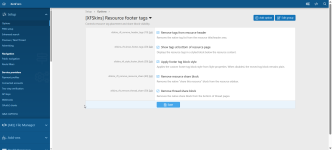
- You can hide the default tag field in the source title.
- The source page offers a separate option to hide the sharing block.
- The topic page offers a separate option to hide the sharing block.
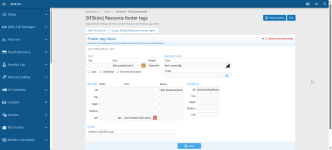
- The label block background, font style, border, color, radius, and spacing values can be edited via the style property.
- The title and icon colors work in harmony with the chosen border color.
- Removes unnecessary list markers/dots from the tag list.
- It works with XenForo's native Options and Style properties system.
Settings
Options:
Setup -> Options -> [XFSkins] Resource footer tags
Style properties:
Appearance -> Styles -> Style properties -> [XFSkins] Resource footer tags
Requirements
- XenForo 2.3.0+
- XenForo Resource Manager 2.3.0+
- PHP 7.2.0+
Setup
- Install the zip file as a plugin from the XenForo admin panel.
- Install the plugin or upgrade the current version.
- Edit the visibility options from the Options section.
- Customize the appearance of the label block to match your theme from the Style properties section.
Release Notes
1.0.3 Patch 3
- Footer tag block style property added.
- Background, text, border, radius, padding, and extra CSS areas have been made customizable.
- The title and icon colors are linked to the border color.
- Separate hiding options have been added for source and topic sharing blocks.
- The placement of tags above the sharing block on the topic page has been adjusted.
- The unnecessary admin navigation link has been removed; settings now work within XenForo's native Options area.


![[XFSkins] Resource Downloads - Who Downloaded the Resource?](/data/resource_icons/0/450.jpg?1780245836)


