
- Compatible XF 2.x versions
- 2.3
Looking to increase user engagement and interaction on your forum but don't know how? Today, I'll introduce you to the [VNXF] Level System add-on . Designed entirely to Modern & Premium standards , both in terms of algorithms and the cutting-edge Glassmorphism interface, this add-on transforms your forum into a true "Farming Machine," maximizing user retention rates!
The system doesn't calculate levels based on physical experience points (XP) earned from actual activities. It supports two standard MMORPG game calculation methods:
- Linear: Easy to calculate, each level requires the same amount of XP (e.g., 100 XP equals 1 level).
- Progressive: The true level. The higher the level, the steeper the XP required to level up, challenging the Member's patience! Calculation: BaseXP * level^coefficient.
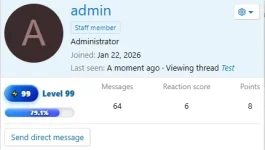
- Progress Bar: The striking Neon Gradient design on Postbit creates a visually appealing and professional look.
- Micro-Interactions (Glass Tooltip): When the user hovers the mouse over the experience bar, a Glassmorphism-style tooltip will appear displaying the "Level Achieved / Next Level Needed" information in a very subtle and compact way, saving mobile space.
- The unique Dynamic Badge system: 10 tiers of colors ranging from Bronze, Silver, Gold, Platinum up to Divine . The higher the level, the more vibrant the badge colors!
- Avatar's layout is round, neat, and sophisticated.
- Responsive and self-adjusting.
- Set the number of widgets displayed flexibly in the Widget Options.
- Interaction Log: Records all XP farming transactions by members (Who? How much? From which post/thread/reaction?), includes a one-second Clear Log button for a super cool database cleanup.
- Custom Titles: Administrators can change the display title for each level as they wish (e.g., Level 1 - Rookie, Level 99 - Demon Lord).
- Modify 1-1 parameters: You can go to User Edit in AdminCP to directly "inject" the current XP level or percentage for a specific user easily.
- The Total Historical XP storage mechanism ensures that users will NEVER lose XP or cheat levels whenever you change the point-earning coefficients.
To ensure the system functions correctly after installation, PLEASE READ THE FOLLOWING STEPS CAREFULLY .
After installing the add-on, go to Options > [VNXF] Level System. Here you decide the fate of your forum grinding level:
- XP (Per Action) Rewards: This section specifies the number of XP received for posting new content, commenting, or receiving Reactions.
- Max Level: Prevents spamming that could overwhelm the universe (Default 100).
- Formula Type: It should be set to Progressive .
- Base XP: How much XP is needed for level 2? (It should be 50 or 100).
- Multiplier: The higher the multiplier , the more bitter the game becomes from Level 3 onwards. (Recommended to use a fixed value of 1.2 to 1.5)
You must force the Xenforo system to recalculate after saving the configuration by:
- Go to Admin CP -> VNXF Level -> Manage Levels .
- Find and click Rebuild Base XP Formula . This will change all level scoring benchmarks in the database.
- Next, find the " Rebuild All User XP" command and click " Run" to have the system rescan your total points and automatically distribute rewards/titles according to the new formula to all Forum Members!
- If you have manually adjusted the XP points and Level for a user, you must use Safe Rebuild All User XP instead of Rebuild All User XP to avoid losing the points you adjusted yourself.
- Go to Appearance -> Widgets .
- Click Add widget -> Select [VNXF] Top Level Widget.
- Enter the number of members you want to display (e.g., 5).
- In Display in positions , select Forum list: Sidebar or Forum list: Above nodes, depending on your forum structure. Test it on the interface!
-
 99915-d391e34a266a65db22f5b254f963226b.webp
 -
 99914-f9ce406b04ae75e3bd50e7e2e65da54f.webp
 -
 99913-f6632457ed5cc452e759dff9b6b462e3.webp
 -
 99912-3c8f4db3c99f1134e284595dff089b20.webp
 -
 99911-aff84996b9d243ca4edbfbe66f13e9c1.webp
 -
 99910-e868d759d73b771f4649e6c30d3f190c.webp
 -
 99908-c11b3b807010054a7d36e6a593ff5a86.webp


![[VNXF 2x] Best Statistics](/data/resource_icons/0/293.jpg?1770654980)
![[VNXF 2x] Download Countdown](/data/resource_icons/0/291.jpg?1770654566)
![[VNXF 2x] Google Translate](/data/resource_icons/0/292.jpg?1770654805)
![[VNXF 2x] More Threads](/data/resource_icons/0/285.jpg?1770647263)